12 testers
- 12 verified testers on real devices
- Full 14-day closed test
- Basic bug report
- Live progress dashboard
- Email and chat support
Google Play closed testing service
Real people on real Android devices run your Google Play closed test: 12 testers for the full 14 days, zero chasing. You watch the progress live, then request production access with a 99.9% success rate behind you.
From $19.99 · Starts in 4-6 hours · Money-back guarantee
Real results
Google sends it when your app passes the 14-day closed test. Our testers have earned it for 7,400+ apps and counting.
Video review
A real developer tried friends and online communities first. Two rejections later he switched to PrimeTestLab, finished the 14 days, and went live. Here he is, unedited.
Enterprise plan · 25 testers · Approved after the 14 days
Summary: Salman, an indie developer, got rejected twice during Google Play closed testing because he couldn't keep enough real testers active. Friends, WhatsApp groups, and online communities all failed. After discovering PrimeTestLab, he signed up for the 25 testers plan, all testers stayed active, he completed the requirements stress-free, and his app received Google Play production access. He shows the approval email and live Play Console dashboard in the video.
Hey there, my name is Salman and I'm an indie developer. The fact is that I was actually getting rejected all the times. I even got rejected twice during the closed testing stage, because I couldn't have enough real testers active.
I tried everything. I was asking my friends, sharing in WhatsApp groups, posting in online communities, but nothing worked. People would join and then they disappeared. I was feeling really stuck. I didn't know what to do next and I was really frustrated because I had spent a lot of time building the app.
And then someone told me about PrimeTestLab and I just decided to give it a try and see what happens. I got the 25 testers plan and it worked perfectly. The testers joined properly, they stayed active, and for the first time I was able to complete the testing requirements without any stress.
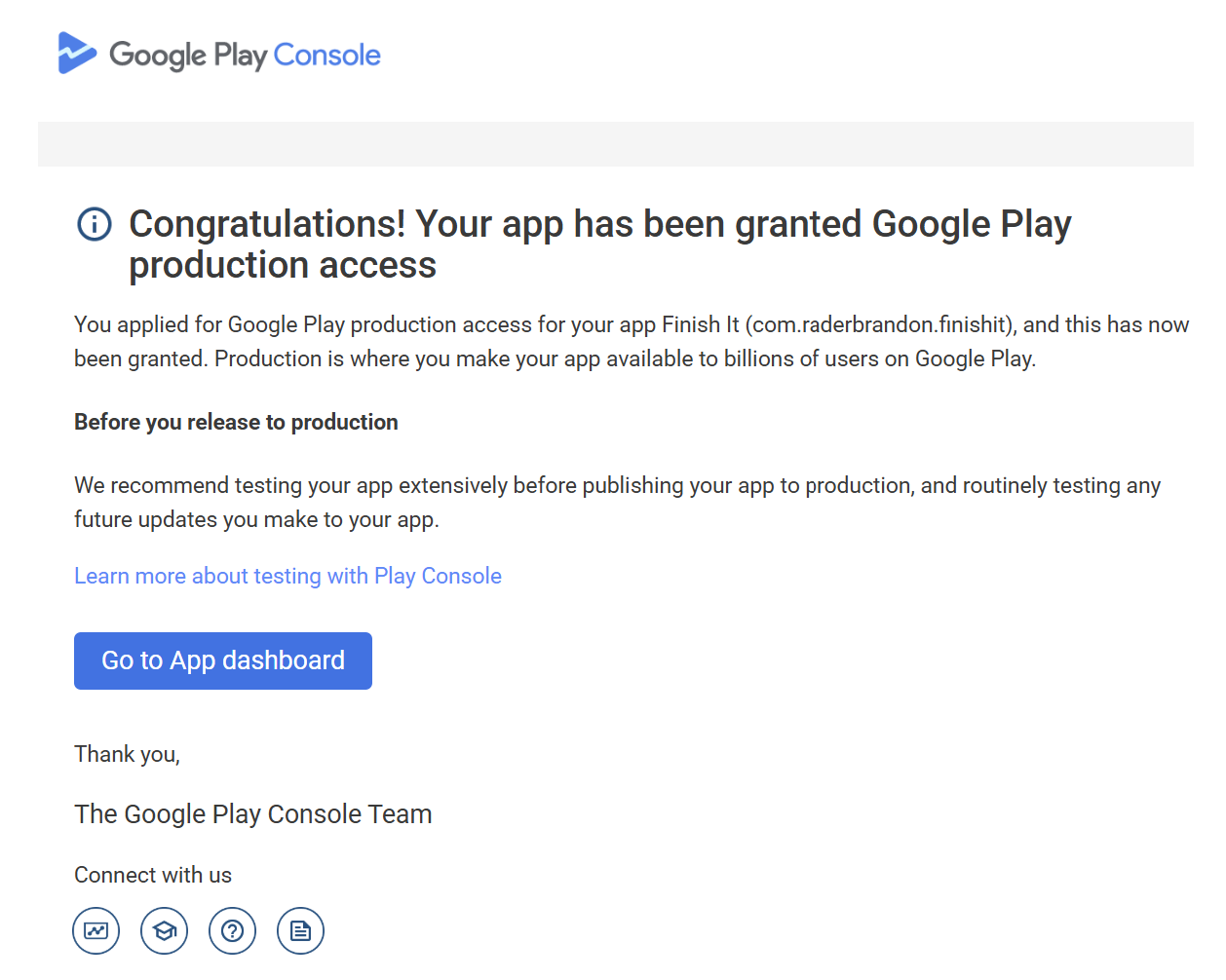
And now let me show you the email that I received from Google Play. As you can see, we've received an email from Google Play Support. It says: "Congratulations, your app has been granted Google Play production access."
Let's click on the app dashboard and see what's in here. Yeah, as you can see, the app is already approved. It has already gotten 42 installs. The production tab has already been enabled as well.
I wish I had found it earlier because it would have saved me a lot of time and frustration.
Shot by the customer · Unedited
Pricing
No subscription - one payment plus a 5% service fee at checkout. Every plan runs the full 14-day closed test; if Google does not approve, you choose a free retest or a full refund.
12 testers
25 testers
20 testers
If your app is not approved after our testing, you get a full refund. No questions asked.
How it works
Built for first-time publishers passing Google Play's 12-tester closed testing requirement. If you get stuck anywhere, support answers on WhatsApp in minutes.
Check out in two minutes with just your email. We send your tester list right away; paste it into Play Console and share your test link with us.
12+ verified testers install your app on real Android devices and use it every day, exactly the 12 testers for 14 days Google checks for. You watch each tester and each day live from your dashboard.
Request production access and answer Google's short questionnaire. We hand you proven answers, and if Google pushes back, we retest free.
Every tester on your track opens your app each day of the 14-day window and uses it the way a normal user would: they work through your core flows, spend real time inside the app, and stay installed and opted in from the first day to the last. That daily rhythm is the whole game. Google's requirement counts opted-in testers continuously, so a volunteer who shows up for three days and disappears is worth nothing; our testers are managed, reminded, and replaced the same day if life gets in the way.
While they test, they take notes. Anything broken, confusing, or slow gets written down with the device model and the steps to reproduce it, and those notes become the bug report you receive at the end. On the bigger plans the notes go deeper: edge cases, usability feedback, and suggestions, not just crashes.
On our side, coordinators watch every track's opt-in count and day streak on the same dashboard you see. If a tester's activity dips, a replacement steps in from the same pool before your count is ever at risk, which is exactly why the Professional and Enterprise plans carry extra testers as a buffer. You never chase anyone, remind anyone, or count days. The streak is our job; the app is yours.
Testing starts in 4-6 hours · See the full process, step by step
Testing reports
It is one of the questions we hear most, so here is the answer: every order ends with a testing report. Open the sample and read a real one.
Included with every plan. Depth grows with the plan.
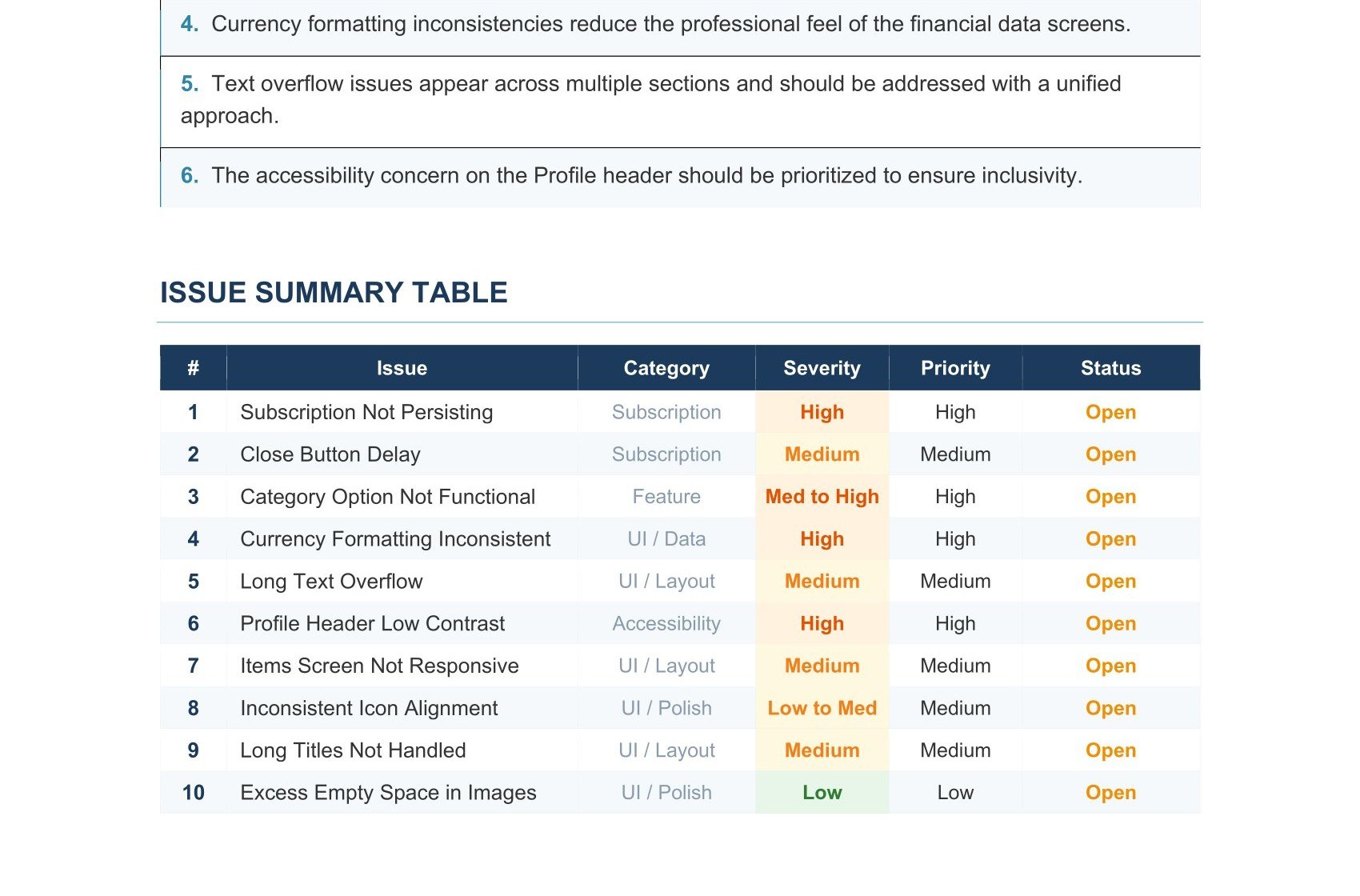
The sample above is a real client report, shared with permission, and yours follows the same structure. It opens with a summary of the testing cycle: the app, the plan, the window, and what our testers focused on. Then comes the part most developers jump to, the issue summary table: every finding in one grid with a severity rating, a priority, and a status, so you can read the shape of your app's health in ten seconds.
Each issue then gets its own entry: what happened, where it happened, and the steps to reproduce it, written so a developer can act on it without asking follow-up questions. Findings range from crashes and broken flows to UI inconsistencies and copy problems, ranked so you fix what matters first.
Depth scales with the plan. Starter reports cover the essential bugs, Professional adds detail and reproduction notes, and Enterprise reports are comprehensive, including usability feedback and suggestions. Open the PDF and read it end to end; it is exactly what lands in your inbox.
Compare
Two of them put your 14-day streak, and the $25 you paid Google, at risk. If you're comparing Android app testing services, here is the honest picture.
Friends, Reddit threads, tester-exchange groups.
Five-dollar gigs and bulk "testers".
12+ managed testers on real devices.
Reviews
Real reviews from real orders, from developers who are on Google Play today.
2,200+ reviews on Fiverr
120+ countries · 99.9% approvedKefayatullah is an OUTSTANDING professional in the user testing domain! His exceptional attention to detail and QUICK responsiveness made working with him a delight. Highly recommend!
We were very happy with Kefayatullah's professionalism and responsiveness. He provided great insights with screenshots and detailed descriptions. I recommend his team to anyone looking for mobile app testing.
Experience was flawless. Clear communication, real testers across diverse devices, and highly organized documentation made everything smooth. As someone publishing for the first time, I really appreciated it.
Exceeded expectations! More testers than asked for, detailed reports with great attention to details. Guided me on publishing!
I wish I had done this sooner. Very detailed reports on findings. Far exceeded my expectations and great value.
Amazing! Detailed, constructive feedback. Bugs spotted quickly, suggestions for balance and usability were great.
Used the service for closed beta testing and was very pleased with the results. Everything was delivered as promised, app passed on first try without any issues. Great team!
Kefayatullah helped every step along the way. Got approved in < 24hrs. Highly recommend and will work again with him in the future.
Testing process was fast, efficient, and professional. App was approved without any delays. Highly recommended.
Showing 9 of 192 featured reviews
Guides
Everything we know about passing the 12-tester requirement, written down. Start with these three.
Why Google requires the 14-day closed test, and how to get your app approved on the first try.
Read the guideThe rejection patterns we see most often, and what to change before you apply again.
Read the guide12 is the floor, not the target. How a buffer of extra testers stops one dropout from resetting your 14-day streak.
Read the guideClosed testing 101
This is what we explain to developers on WhatsApp every day, written down. Pick a chapter; the whole requirement is covered.
01 · The requirement
Google's own wording, from the Play Console Help center, is short:
"If you have a newly created personal developer account, you must run a closed test for your app with a minimum of 12 testers who have been opted-in for at least the last 14 days continuously."
Three details in that sentence decide everything. The testers must be opted in, not just added to a list. The 14 days must be continuous, an unbroken stretch. And the rule applies to personal developer accounts created after November 13, 2023. Organization accounts and personal accounts older than that date are exempt, which is why an older tutorial or a friend with a 2019 account may tell you the requirement does not exist. For a new personal account, it does, and there is no way around it.
You will meet the rule inside Play Console as a locked "Apply for production" step: publishing to closed testing works right away, but the production track stays closed until the console has counted at least 12 opted-in testers for 14 consecutive days. The $25 registration fee you paid covers unlimited apps, but this testing gate is per app, so every new app on a new personal account walks the same road. Our complete guide to the 12-tester requirement covers the policy line by line.
02 · Background
The requirement arrived in late 2023, when Google tightened the rules for new personal developer accounts. The stated goal is quality: apps should reach the public store after real people have genuinely used them, not straight from a build machine. For Google, two weeks of live tester activity filters out low-effort and spam submissions far more reliably than a code review ever could.
The requirement actually launched harder than it is today: new accounts originally needed 20 testers, and Google reduced the number to 12 in December 2024 while keeping the same 14-day duration. If you read a forum thread demanding 20 testers, it is outdated; our guide on the change from 20 to 12 testers has the details.
One thing Google is clear about: how you find your testers is up to you. Friends, coworkers, communities, or a paid Google Play testing service are all acceptable, because Google does not restrict who your testers are or how you recruit them. What violates policy is fake engagement: bots, emulator farms, and incentivized installs that do not reflect genuine usage. That distinction is exactly why we only run real people on real devices.
03 · Where it goes wrong
Most failed attempts we take over broke one of the same five rules:
04 · Our process
Day 0. You order with just an email address and get your tester list as a CSV within 4-6 hours, any day of the week. You paste it into Play Console, share your opt-in link with us, and our testers start accepting the same day. Your part takes about 7 minutes; if you get stuck, support walks you through it on WhatsApp.
Days 1 to 14. 12 or more verified testers (20 or 25 on the bigger plans, so a dropout can never sink the count) use your app daily on their own Android devices. You watch the opt-in count and the day streak live on your dashboard, and if a tester ever drops, we replace them from the same pool immediately. This is the part you cannot easily do with volunteers: keeping 12 strangers active every single day for two weeks.
Day 14 and after. You apply for production access and answer Google's questionnaire. We hand you answers that have worked 7,400+ times, and if Google asks for more testing, we rerun the cycle free. Across those apps our success rate is 99.9%. The full process page shows every step with screenshots, or jump straight to pricing.
05 · Tester quality
A real tester is a real person with their own Google account, using your app on a physical Android device. Our pool spans Samsung, Pixel, Xiaomi, OnePlus and other everyday hardware across 120+ countries, which also gives your app a spread of screen sizes, Android versions, and network conditions that a single friend group never covers.
Tester location does not matter for the requirement. Production access and store availability are two separate gates: Google counts opted-in testers wherever they live, and the countries your app launches in are whatever you select in your store listing. If your testers are in 15 countries and your app targets only Canada, that is fine; our guide on testers in different countries walks through both gates.
What does not count: emulators, device farms, and bot accounts. They typically fail to register as genuine testers and can be flagged, and the account paying for them is the one taking the risk. That is the real cost hiding inside five-dollar tester gigs, and it is why emulators and closed testing do not mix. We never use them, full stop.
06 · Deliverables
Three things, and all of them are checkable before you pay. First, a live dashboard on our site tracking every tester and every day of your 14-day window, so you always know exactly where your test stands. Second, bug notes as our testers hit issues, ranked by severity and priority. Third, a final PDF report at the end of the cycle: basic on Starter, detailed on Professional, comprehensive on Enterprise. You can open a real client report right now and see the exact format.
Behind the deliverables sits the guarantee: if your app is not approved after our testing, you choose between a free retest and a full refund. That promise is written into our refund policy, not just this page.
07 · Going live
When the console shows the requirement met, an "Apply for production" button unlocks. Google then asks you a short questionnaire in three sections: about your closed test, about your app, and about your production readiness. The answers matter; vague ones are a common reason applications bounce. We hand every customer proven questionnaire answers to adapt, based on what has actually passed review.
Google says the production review "usually takes 7 days or less, but may occasionally take longer", and in our experience most apps clear it comfortably inside that window. Once approved, your app is live on Google Play and the closed testing requirement is behind you for that app, permanently. If Google pushes back instead, you do not start over alone: we rerun the 14-day cycle at no cost and stay with you until the approval email lands. That email is the whole point of this page, and your 12 testers are ready whenever you are.
08 · Account types
The 12-tester requirement applies to one group: personal developer accounts created after November 13, 2023. If that is you, and for almost every solo developer registering today it is, the closed test is mandatory. Two groups are exempt: organization accounts, and personal accounts created before that date.
Reading that, some developers consider registering as an organization just to skip the testing gate. For most, the trade is worse than the requirement. An organization account needs a D-U-N-S number, which Google notes can take up to 28 days to obtain or verify, plus organization details that a solo developer often does not have. In other words, the escape route can take twice as long as simply running the 14-day test, and it changes how your developer name appears on the store. There are good reasons to register as an organization (a real company, team access, certain app categories), but dodging closed testing is rarely one of them.
If you are genuinely torn, our guide on personal vs organization accounts walks through the decision. The short version: register the account type that matches who you are, and if that lands you on the 12-tester road, that road is exactly what this page and this service are for.
09 · Timeline
Here is the full sequence for a brand-new personal account, with realistic timings. You pay the one-time $25 registration fee and complete Google's identity verification. You upload your app as an app bundle and, if you want a quick sanity check, push it to internal testing first, which is available within minutes (though the internal test link can take a few hours to appear after a first publish). Internal testing is optional and does not count toward the requirement.
Then the part that owns the calendar: the closed test. Setup with us takes 4-6 hours, the test itself is a fixed 14 days, and there is no way to compress it, for us or anyone. After day 14 you apply for production, and Google's review usually takes 7 days or less. Add it up and a clean first-try run lands at roughly three weeks from fee to live app, of which the 14-day test is the floor and everything else is small.
The number one schedule killer is not Google's review; it is a broken streak. Every day the opted-in count dips below 12, the window restarts and the calendar slips by two more weeks. That is the single strongest argument for running the test with managed testers and a buffer. If you have just paid the fee and are wondering what comes first, start with our roadmap for new developer accounts.
10 · The decision
You do not need us. That is worth saying plainly: recruiting your own testers is free, allowed, and works when you genuinely have the people. The real question is whether you have 12 committed humans who will open your app every single day for 14 days, plus a few spares for the ones who quietly drop out. Friends and family say yes and then forget by day five. Communities and tester-exchange groups can fill a list, but exchanges cost you hours of testing other people's apps in return, and strangers owe you nothing on day nine. Our guide to the seven legit ways to get 12 testers covers every route with its real cost.
The pattern we see in failed DIY attempts is always the same: a strong start, attrition in week two, a broken streak discovered too late, restart. Repeat that twice and a free method has cost six weeks of launch delay.
The five-dollar shortcut is the one option we will warn you off: bulk "tester" gigs run on emulators and bot accounts that typically do not count and can be flagged, and the account taking that risk is yours. A managed service costs more than $5 and less than your time: from $19.99, one payment, guaranteed count with replacements, a written report, and a money-back guarantee. If the launch date matters, that is the trade. Compare the plans and decide with the numbers in front of you.
11 · Recovery
A failed attempt blocks nothing. Google does not penalize you for a closed test that fizzled; the requirement simply stays unmet until a proper 14-day window completes. When we take over after a failed attempt, we start a fresh cycle with our own verified testers, add a buffer so the count never dips, and fix whatever sank the first run, which is usually testers who never opted in or activity that faded mid-window. One of our customers came to us after two failed attempts and went live on the next cycle; his story is the video further up this page, and the full breakdown is in the case study.
If your test is running right now and wobbling, you may not need to start over. Testers can be added to a live track at any time, so topping up a shaky list is allowed. The unforgiving part is the streak: if your opted-in count never dropped below 12, your days so far still count, but if it dipped, the continuous window has already restarted whether the console makes that obvious or not. Message us on WhatsApp with a screenshot of your track before you make changes; diagnosing a live test costs nothing and takes minutes.
12 · Pre-flight
Closed testing is the biggest gate, but a handful of other requirements can stall a launch at the last step, and they are all cheap to fix in advance. The Data safety form is required before you can publish to closed, open, or production tracks (only internal testing is exempt), and apps that collect no data at all still have to complete it. Your build must meet the target API floor: API 35 is in force today, and new apps and updates must target API 36 from August 31, 2026. New apps ship as an Android App Bundle with Play App Signing, and the package name is permanent: it cannot be deleted or reused, so pick your applicationId like you will live with it forever, because you will.
The store listing has minimums too: an app name up to 30 characters, a short description up to 80, a full description up to 4,000, a 512x512 icon, and at least two phone screenshots before you can publish. None of this is hard, but discovering it on day 14 of a finished closed test wastes the momentum. Our Google Play publishing requirements guide is the complete pre-flight list; run through it while your test is running and the two weeks end with everything ready to submit.
13 · Glossary
Google's docs and half the forum threads assume you already speak Console. Here is the vocabulary of this page, defined once:
FAQ
If yours isn't here, ask us directly. A human answers, fast.
No. Google requires closed testing with real testers, and that is exactly what we provide: real people who opt in with their own Google accounts and use your app on their own devices. Google does not restrict who your testers are or how you recruit them, so using a paid testing service is allowed. What its policy forbids is fake engagement: bots, emulators, and incentivized installs that do not reflect genuine usage. Those are what get developer accounts in trouble, and we never touch them. Every tester we supply behaves exactly like the volunteers you would recruit yourself, except they actually show up every day for the full 14 days. That is the entire difference, and it is how 7,400+ apps have been approved through this exact process.
Google's rule for newly created personal developer accounts: you must run a closed test with at least 12 testers who have been opted in for at least the last 14 days continuously before you can apply for production access. It applies to personal accounts created after November 13, 2023; organization accounts are exempt. Three words carry all the pain. Opted in: testers you add but who never accept the invite do not count. Continuously: Google looks for an unbroken 14-day window with 12+ active testers, so one dropout can restart the clock. Per app: each new app clears the requirement separately. That is the requirement our Google Play testing service exists for: we supply the 12+ real testers, keep them active for the full 14 days, and watch the streak so you do not have to.
You choose: a free retest, or you take a full refund. 99.9% of apps make it, so this rarely comes up, but the guarantee is real and written into our refund policy. A pushback from Google usually means it wants to see more genuine testing activity or clearer production questionnaire answers, and both are fixable: we rerun the 14-day cycle at no cost, tighten your answers, and stay on it until the approval email arrives. You are never left alone with a rejection.
Yes. Every tester is a verified human on a physical Android device, from Samsung to Pixel to Xiaomi, across 120+ countries. No emulators, no device farms, no bot accounts, ever: those typically do not count toward the requirement, Google can flag them, and the developer account using them carries the risk. Real devices also mean your app gets exercised across different screen sizes, Android versions, and real network conditions, which is where genuine bugs live. When our report says the app misbehaved on a mid-range Samsung, that came from an actual phone in an actual pocket.
No. Production access and store availability are two separate gates. Google counts opted-in testers wherever they live, and your launch countries are whatever you select in your store listing. Our testers span 120+ countries, and that spread has never been the reason an app failed the requirement. The one thing to check during setup is that your closed test track is available in the testers' countries, which we walk you through after your order. For the full breakdown of both gates, read our guide on testers in different countries.
Internal testing is a quick distribution track for your own team: up to 100 testers, available within minutes, no waiting period, but it does not count toward production access. Closed testing is the track Google actually gates production behind for new personal accounts: 12+ opted-in testers, 14 continuous days. A common mistake is spending a week on the internal track and expecting the production button to unlock; it will not, because only closed testing counts. Use internal testing to sanity-check your build, then run the closed test to earn production. Our comparison of the testing tracks covers when to use each.
Your order is set up within 4-6 hours, any day of the week, weekends included. As soon as our testers opt in, your 14-day clock starts; most developers order in the morning and see testers active the same day. The realistic timeline from order to production application is about 15 days: a few hours of setup, 14 days of testing, then Google's review. If you are racing a deadline, order first and message us on WhatsApp; setup is the only part that can be compressed, and we compress it.
It takes about three minutes. In Play Console, open Testing, then Closed testing, and create or open your track. In the Testers tab, choose an email list, paste the tester emails from the CSV we send you, and save. Then copy the opt-in link Google shows on the same page and send it to us; our testers use it to accept. That is your whole part. If anything looks different in your console or the opt-in link does not appear, message us on WhatsApp with a screenshot and we will walk you through it live. Step-by-step instructions with screenshots are in our guide on how to invite testers.
Nothing. Your only job was the 7-minute setup. The dashboard shows every tester and every day live, and support messages you if anything needs attention. You can keep building in the meantime: uploading new versions of your app during the test is allowed and does not reset the clock, so ship fixes as our testers report bugs. Many developers use the two weeks exactly that way, and their apps go into Google's review stronger than they started.
Play Console unlocks the "Apply for production" step. Google asks a short questionnaire in three sections: about your closed test, about your app, and about your production readiness. We hand you proven questionnaire answers to adapt, because vague answers are a common reason applications bounce. Google says the review usually takes 7 days or less, though it can occasionally take longer. Once approved, your app is live on Google Play and the requirement is behind you for that app, permanently. If Google asks for more testing instead, we rerun the cycle free.
12 verified testers for the full 14 days, a live progress dashboard, testing on real devices, bug notes when we find issues, a written report at the end, proven answers for Google's production questionnaire, and free retesting if Google pushes back. One payment, no subscription. The bigger plans exist for one reason: safety margin. Professional (20 testers) and Enterprise (25 testers) run 8 and 13 extras above the requirement, so a dropout can never break your streak, and their reports go deeper. If your launch date matters, the buffer is what you are buying.
Visa and Mastercard, processed by Stripe with encrypted checkout; we never see or store your card details. Payment is one-time per order: no subscription, nothing renews. Checkout takes about two minutes with just your email address, and the money-back guarantee applies from the moment you pay, as written in our refund policy.
Yes, this is one of the most common situations we take over. Rejections usually trace back to testers going inactive mid-window, testers who were added but never opted in, or emulator activity Google did not count. We start a fresh 14-day cycle with our own verified testers, add a safety buffer so the count never dips, and tighten your questionnaire answers before you reapply. Nothing about a previous rejection blocks a new, properly run test. Our breakdown of why closed testing gets rejected shows the patterns, and the video review above is from a developer who came to us after two failed attempts.
Yes. The requirement is per app, so each closed test needs its own order and its own 14-day window, but many developers run several apps with us, sometimes at the same time. Each order gets its own tester list and its own dashboard, so nothing overlaps. If you are planning a portfolio of apps, message us on WhatsApp first; we will help you sequence the tests so your launches do not wait on each other.
or email info@primetestlab.com · book a 30-minute call
Chat on WhatsAppGoogle Play closed testing
Order in two minutes and testing starts within 4-6 hours.
From $19.99 · No subscription · Money-back guarantee